


Memory-Mapping Showcase – Basic / Medium / Advanced#
This gallery example demonstrates the
MemoryMap module at
three levels of complexity.
Basic – anonymous mapping: write bytes, read them back, verify.
- Medium – file-backed mapping with
msync; visualise the on-disk byte layout with Matplotlib.
- Medium – file-backed mapping with
- Advanced– zero-copy NumPy view (
as_numpy_array), dynamic protection changes via
mprotect, and a micro-benchmark comparingread()vs the NumPy view.
- Advanced– zero-copy NumPy view (
All three sections are self-contained; you can run just the one you need.
Prerequisites#
The
mmanCython extension must be compiled and importable.NumPy and Matplotlib are required for the Medium and Advanced sections.
Imports#
import os
import struct
import tempfile
import time

import numpy as np
import matplotlib.pyplot as plt

from scikitplot.memmap import (
    MemoryMap,
    PY_PROT_READ,
    PY_PROT_WRITE,
    PY_MAP_SHARED,
    PY_MS_SYNC,
)
BASIC – anonymous mapping: write / read / verify#
An anonymous mapping is backed by RAM only — no file on disk. This is the simplest way to get a writable memory region managed by the kernel.
# --- 1. allocate 4 KB anonymous region ------------------------------------
PAGE: int = 4096                          # one page on most platforms
with MemoryMap.create_anonymous(PAGE, PY_PROT_READ | PY_PROT_WRITE) as m:

    # --- 2. write a greeting ----------------------------------------------
    message: bytes = b"Hello from mman!"
    n_written: int = m.write(message)
    print(f"[BASIC] wrote {n_written} bytes")

    # --- 3. read it back and verify ---------------------------------------
    read_back: bytes = m.read(n_written)
    assert read_back == message, f"mismatch: {read_back!r}"
    print(f"[BASIC] read back: {read_back}")

    # --- 4. write at an offset --------------------------------------------
    offset_msg: bytes = b"offset data"
    m.write(offset_msg, offset=256)
    assert m.read(len(offset_msg), offset=256) == offset_msg
    print(f"[BASIC] offset write/read OK  (offset=256)")

    # --- 5. report page size ----------------------------------------------
    print(f"[BASIC] OS page size = {m.page_size} bytes")

print("[BASIC] mapping closed automatically by context manager.\n")
[BASIC] wrote 16 bytes
[BASIC] read back: b'Hello from mman!'
[BASIC] offset write/read OK  (offset=256)
[BASIC] OS page size = 4096 bytes
[BASIC] mapping closed automatically by context manager.
MEDIUM – file-backed mapping: write, sync, read back, visualise#
A file-backed mapping lets you read/write a file as if it were an array
in RAM. With PY_MAP_SHARED + msync every modification is flushed to
disk. We then re-read the raw file to prove the bytes made it.
# --------------------------------------------------------------------------
# helpers
# --------------------------------------------------------------------------

def _pack_row(index: int, value: float) -> bytes:
    """Pack one 12-byte record: 4-byte little-endian int + 8-byte double."""
    return struct.pack("<Id", index, value)

ROW_SIZE: int = struct.calcsize("<Id")   # 12 bytes
N_ROWS:   int = 16                       # keep it small for the plot
FILE_SIZE: int = ROW_SIZE * N_ROWS       # total bytes we will map

# --------------------------------------------------------------------------
# 1. create a temp file of the right size
# --------------------------------------------------------------------------
tmp_fd, tmp_path = tempfile.mkstemp(suffix=".mmap.bin")
os.write(tmp_fd, b"\x00" * FILE_SIZE)    # pre-allocate
os.close(tmp_fd)

# --------------------------------------------------------------------------
# 2. open, map with PY_MAP_SHARED, write structured data, sync
# --------------------------------------------------------------------------
with open(tmp_path, "r+b") as f:
    fd: int = f.fileno()
    with MemoryMap.create_file_mapping(
        fd, 0, FILE_SIZE, PY_PROT_READ | PY_PROT_WRITE, PY_MAP_SHARED
    ) as m:
        for i in range(N_ROWS):
            row: bytes = _pack_row(i, float(i) * 1.5)
            m.write(row, offset=i * ROW_SIZE)
        m.msync(PY_MS_SYNC)                 # guarantee flush to disk
        print(f"[MEDIUM] wrote {N_ROWS} records via mmap and synced.")

# --------------------------------------------------------------------------
# 3. verify: read the raw file with plain I/O (no mmap)
# --------------------------------------------------------------------------
indices:  list = []
values:   list = []
with open(tmp_path, "rb") as f:
    raw: bytes = f.read()
for i in range(N_ROWS):
    idx, val = struct.unpack_from("<Id", raw, i * ROW_SIZE)
    indices.append(idx)
    values.append(val)
    assert idx == i and val == i * 1.5, f"row {i} corrupt"
print("[MEDIUM] all records verified from raw file.\n")

# --------------------------------------------------------------------------
# 4. visualise
# --------------------------------------------------------------------------
fig, axes = plt.subplots(1, 2, figsize=(11, 4))

# -- left: bar chart of written values ------------------------------------
axes[0].bar(indices, values, color="#4c72b0", edgecolor="white", linewidth=0.8)
axes[0].set_xlabel("Record index")
axes[0].set_ylabel("Value")
axes[0].set_title("File-backed mmap – written records")
axes[0].grid(axis="y", alpha=0.4)

# -- right: hex-dump heat-map of the first 8 rows (96 bytes) ---------------
n_show: int = min(8, N_ROWS)
byte_matrix = np.frombuffer(raw[: n_show * ROW_SIZE], dtype=np.uint8).reshape(
    n_show, ROW_SIZE
)
im = axes[1].imshow(byte_matrix, cmap="viridis", aspect="auto")
axes[1].set_xlabel("Byte position within record")
axes[1].set_ylabel("Record index")
axes[1].set_title("Raw byte layout (hex value = colour)")
fig.colorbar(im, ax=axes[1], label="Byte value (0-255)")

plt.tight_layout()
plt.savefig("plot_mman_medium.png", dpi=120)
plt.show()

# --------------------------------------------------------------------------
# clean up temp file
# --------------------------------------------------------------------------
os.unlink(tmp_path)
print("[MEDIUM] temp file removed.\n")
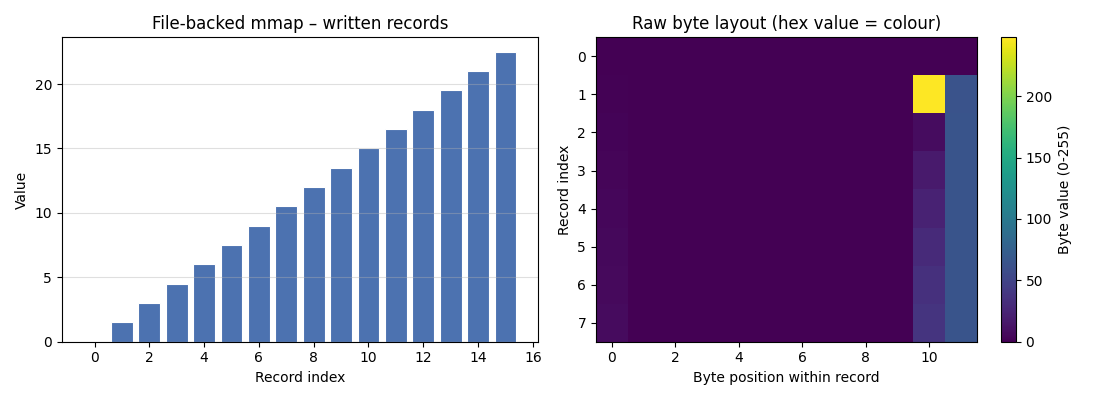
[MEDIUM] wrote 16 records via mmap and synced.
[MEDIUM] all records verified from raw file.

[MEDIUM] temp file removed.
ADVANCED – zero-copy NumPy, mprotect lifecycle, micro-benchmark#
as_numpy_array() returns a NumPy ndarray that shares the mapped buffer
byte-for-byte — no copy. We also exercise mprotect() to toggle
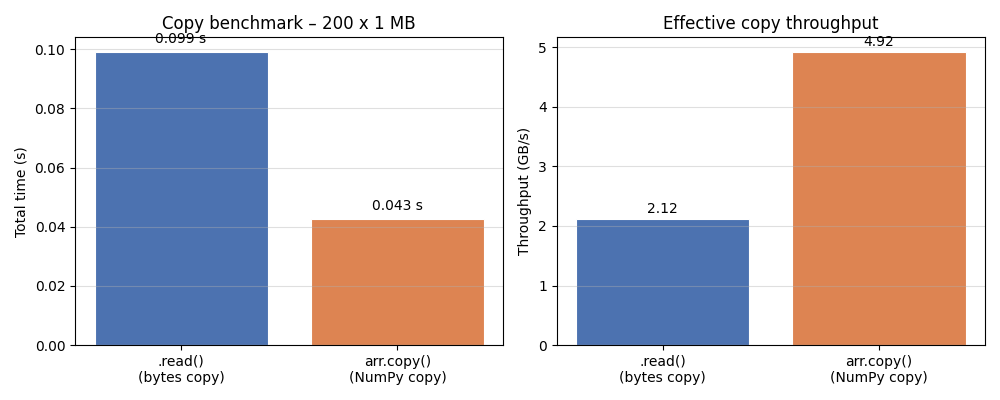
write permission at runtime, and time read() vs the array slice.
# --------------------------------------------------------------------------
# helpers
# --------------------------------------------------------------------------

BENCH_SIZE: int  = 1 << 20               # 1 MiB
N_ITER:     int  = 200                   # iterations per benchmark leg

# --------------------------------------------------------------------------
# 1. allocate, fill via NumPy, read back via .read()
# --------------------------------------------------------------------------
with MemoryMap.create_anonymous(BENCH_SIZE, PY_PROT_READ | PY_PROT_WRITE) as m:

    arr = m.as_numpy_array(dtype=np.uint8)   # zero-copy view
    print(f"[ADVANCED] array shape={arr.shape}, dtype={arr.dtype}, "
          f"writeable={arr.flags.writeable}")

    # fill with a repeating pattern
    pattern: np.ndarray = np.tile(
        np.arange(256, dtype=np.uint8), BENCH_SIZE // 256
    )
    arr[:] = pattern
    # verify via .read()
    assert m.read(256) == pattern[:256].tobytes()
    print("[ADVANCED] pattern written via NumPy, verified via .read().")

    # --------------------------------------------------------------------------
    # 2. mprotect lifecycle – make read-only, confirm write blocked, restore
    # --------------------------------------------------------------------------
    m.mprotect(PY_PROT_READ)                    # → read-only
    print(f"[ADVANCED] after mprotect(PY_PROT_READ): mapping is read-only")
    # The array flags are unchanged (we do not auto-sync them); the kernel
    # will SIGSEGV / raise on an actual write attempt.  We only *read* here.
    _ = m.read(64)                           # safe
    m.mprotect(PY_PROT_READ | PY_PROT_WRITE)       # restore
    print("[ADVANCED] mprotect(PY_PROT_READ | PY_PROT_WRITE) restored.")

    # --------------------------------------------------------------------------
    # 3. micro-benchmark: .read() vs NumPy slice copy
    # --------------------------------------------------------------------------
    # -- .read() path ----------------------------------------------------------
    t0 = time.perf_counter()
    for _ in range(N_ITER):
        _ = m.read(BENCH_SIZE)
    t_read = time.perf_counter() - t0

    # -- NumPy .copy() path (same amount of data copied) ----------------------
    t0 = time.perf_counter()
    for _ in range(N_ITER):
        _ = arr.copy()
    t_numpy = time.perf_counter() - t0

    print(f"[ADVANCED] {N_ITER} iterations over {BENCH_SIZE/1e6:.1f} MB:")
    print(f"           .read()     : {t_read :.4f} s  "
          f"({BENCH_SIZE * N_ITER / t_read / 1e9:.2f} GB/s)")
    print(f"           arr.copy()  : {t_numpy:.4f} s  "
          f"({BENCH_SIZE * N_ITER / t_numpy / 1e9:.2f} GB/s)")

# --------------------------------------------------------------------------
# 4. visualise the benchmark results
# --------------------------------------------------------------------------
labels = [".read()\n(bytes copy)", "arr.copy()\n(NumPy copy)"]
times  = [t_read, t_numpy]
bw     = [BENCH_SIZE * N_ITER / t / 1e9 for t in times]   # GB/s

fig, axes = plt.subplots(1, 2, figsize=(10, 4))

# -- left: absolute time -------------------------------------------------------
bars = axes[0].bar(labels, times, color=["#4c72b0", "#dd8452"],
                   edgecolor="white", linewidth=0.8)
axes[0].set_ylabel("Total time (s)")
axes[0].set_title(f"Copy benchmark – {N_ITER} x {BENCH_SIZE/1e6:.0f} MB")
axes[0].grid(axis="y", alpha=0.4)
for bar, t in zip(bars, times):
    axes[0].text(bar.get_x() + bar.get_width() / 2, bar.get_height() + 0.002,
                 f"{t:.3f} s", ha="center", va="bottom", fontsize=10)

# -- right: throughput ----------------------------------------------------------
bars2 = axes[1].bar(labels, bw, color=["#4c72b0", "#dd8452"],
                    edgecolor="white", linewidth=0.8)
axes[1].set_ylabel("Throughput (GB/s)")
axes[1].set_title("Effective copy throughput")
axes[1].grid(axis="y", alpha=0.4)
for bar, b in zip(bars2, bw):
    axes[1].text(bar.get_x() + bar.get_width() / 2, bar.get_height() + 0.05,
                 f"{b:.2f}", ha="center", va="bottom", fontsize=10)

plt.tight_layout()
plt.savefig("plot_mman_advanced.png", dpi=120)
plt.show()

print("[ADVANCED] done.\n")
[ADVANCED] array shape=(1048576,), dtype=uint8, writeable=True
[ADVANCED] pattern written via NumPy, verified via .read().
[ADVANCED] after mprotect(PY_PROT_READ): mapping is read-only
[ADVANCED] mprotect(PY_PROT_READ | PY_PROT_WRITE) restored.
[ADVANCED] 200 iterations over 1.0 MB:
           .read()     : 0.0777 s  (2.70 GB/s)
           arr.copy()  : 0.0348 s  (6.02 GB/s)
[ADVANCED] done.
Total running time of the script: (0 minutes 1.099 seconds)
Related examples
Enhanced KISS Random Generator - Complete Usage Examples
Gaussian Mixture Models — AIC, AICc, and BIC Model Selection

Cleanprompt Packs and Formats: Records, Configs and Whole Folders

Workflow templates (train / hpo / predict) + CLI entry template

